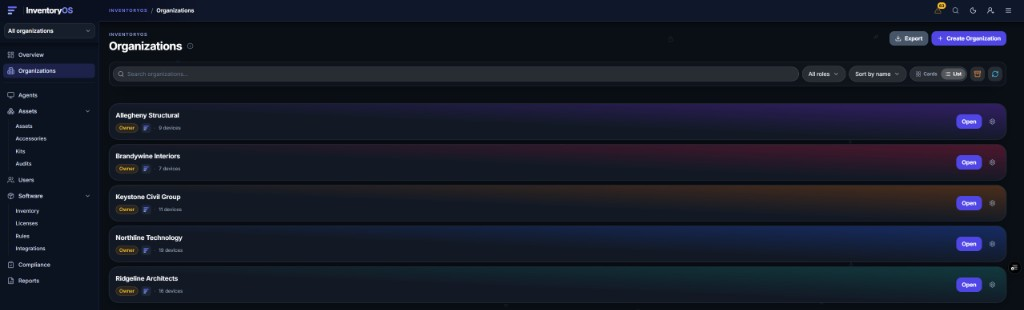
One account. One login. Every client in its own isolated organization, with live agents, per-org compliance, and a place to prove stack coverage without dumping tenants into a single shared spreadsheet.
InventoryOS multi-org is built for MSPs who already run RMM and EDR and still need a clean inventory ledger per client. It does not replace NinjaOne, Huntress, or any other tool in the stack. It is the live inventory and coverage-verification layer that sits beside them.
What multi-org means here
Every MSP client becomes a separate organization in InventoryOS:
- Complete data isolation. Client A never sees Client B’s devices, software, or compliance rules.
- Per-org enrollment keys. Each org gets its own key so agents land in the right tenant.
- Per-org settings and rules. Healthcare baselines can differ from retail without one shared policy for every client.
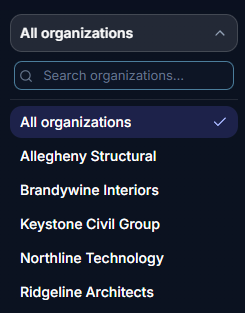
- Single account, fast switching. Jump between client orgs without logging out.
- Per-device billing across orgs. Billable Agents count. Assets CMDB items (printers, switches, and similar gear) are not billable devices.
Related: ITAM vs RMM · spreadsheet vs live inventory · MSP device management guide.
Why MSPs outgrow one sheet per client
Spreadsheets and ad-hoc RMM exports break down when:
- Onboarding speed. New clients need inventory this week, not after someone rebuilds a workbook.
- Policy drift. Every client has different required endpoint protection, banned apps, and browser floors.
- Coverage questions. Insurance and QBR asks are per org, not somewhere in a spreadsheet.
- Tech time. Logging into separate tools and pasting CSVs is not a multi-tenant operating model.
InventoryOS keeps each client org isolated while giving the MSP a single pane for live inventory, compliance, and integration coverage checks.
Onboard a client org
- Create a new organization named for the client.
- Copy the enrollment key from Installers for that org.
- Deploy agents with GPO, Intune, NinjaOne Automation scripts, or manual installers. See deploying agents with Group Policy and the NinjaOne Windows deployment guide.
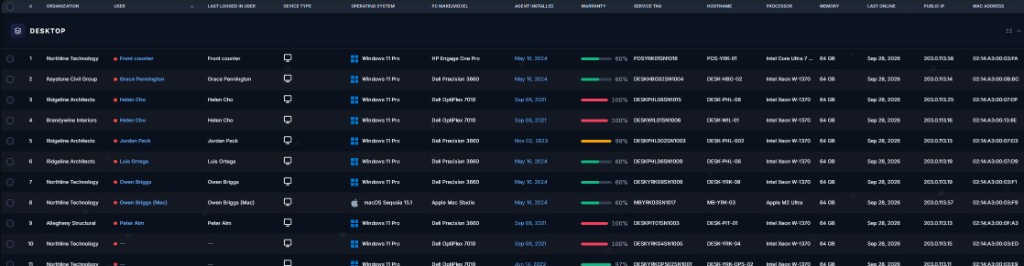
- Watch devices check in on Agents with live hardware and software inventory.
- Set compliance rules for that client: required endpoint protection, banned tools, and browser or OS floors.
- Connect integrations when you want coverage checks. Map Huntress, NinjaOne, or other catalog connectors to this org and verify coverage.
- Re-check after remediations so the org stays audit-ready.
For RMM-centric shops, pair this page with the NinjaOne deploy guide. For endpoint coverage proof, see the Huntress integration guide.
Scaling across many client orgs
As the client count grows, multi-org stays the operating model:
- Organization switcher. Move between clients without separate logins.
- Cross-org visibility. Overview-style views help spot which clients need attention.
- Rule templates and baselines. Start from a required-endpoint-protection and banned-app baseline, then customize per industry.
- Consolidated billing. One commercial relationship, with device counts across orgs. Plan details are on the pricing page.
Shops running 50+ client environments use the same model: isolated orgs, one login, and one place to see which clients need attention.
Guides that sit next to this page
Use this page as the MSP starting point for the guides that are live today. Huntress and NinjaOne links go to Documentation until dedicated integration articles exist.
| Topic | Why it belongs here | Where to go |
|---|---|---|
| ITAM vs RMM | Multi-org is why inventory sits beside RMM. | ITAM vs RMM |
| Spreadsheet vs live inventory | Sheets fail hardest at multi-tenant scale. | Spreadsheet vs live inventory |
| Huntress coverage | Coverage proof is per org, then across orgs. | Huntress integration guide |
| NinjaOne deploy, then verify | Deploy from RMM, then check inventory. | NinjaOne Windows deployment |
| Compliance rules | Per-org baselines for required protection and banned apps. | Compliance rules |
| MSP device management | The broader inventory operations story. | MSP device management guide |
| Deploy via GPO | A common Windows rollout path. | Deploying agents with Group Policy |
| ITAM checklist | An audit list that multi-org makes repeatable. | IT asset management checklist |
A day in the life
This is a composite operator loop, not a customer story.
- Morning. Open overview, spot orgs with compliance or coverage gaps, and drill into the first client.
- Midday. Switch orgs, triage a missing endpoint agent or an unapproved remote tool, remediate in RMM or EDR, and re-check in InventoryOS.
- Afternoon. Onboard a new client org, set the enrollment key, kick off a NinjaOne or GPO deploy, and confirm the first check-ins.
- End of day. Confirm device counts and open gaps across orgs without rebuilding spreadsheets.
FAQ
Does multi-org replace our RMM?
No. RMM deploys and remediates. InventoryOS keeps per-client live inventory and coverage proof. See ITAM vs RMM.
Can clients see each other’s data?
No. Organizations are isolated. The MSP account can switch across orgs they own. Client tenants stay walled.
How do agents land in the right client?
Each org has its own enrollment key. Deploy with that key using GPO, Intune, NinjaOne scripts, or installers.
Can we prove EDR or RMM coverage per client?
Connect catalog integrations, map orgs, and use coverage and gap views. Setup steps for Huntress and NinjaOne are in Documentation.
Is Assets CMDB billed like agents?
Agents and enrolled mobile devices are the billable device basis. Assets CMDB items such as printers and network gear do not count as billable devices. Confirm plan details on the pricing page.
How do we try multi-org?
Start a 14-day free trial with no credit card, or schedule a demo. Confirm live plan details on the pricing page.